
How to Calculate OSHA TRC and DART Rates From Form 300A
Picture the year-end scramble. Your safety coordinator certifies the Form 300A summary, posts it by February 1, and hands it to payroll or the owner. Then comes the question: "Is this a high rate?" Payroll coordinators, HR leads, safety coordinators, and small-business owners all need to know how to calculate OSHA TRC rate and the DART rate formula OSHA 300A uses. These total recordable case incidence rate figures turn raw case counts into comparable metrics, standardized on the 200000 hours OSHA incidence rate baseline.
Rates from OSHA 300A columns H I J—along with deaths—offer a clear snapshot. They let small establishments benchmark against peers without guessing. This guide walks through the steps directly from your Form 300A.
The Standard OSHA Incidence Rate Formula
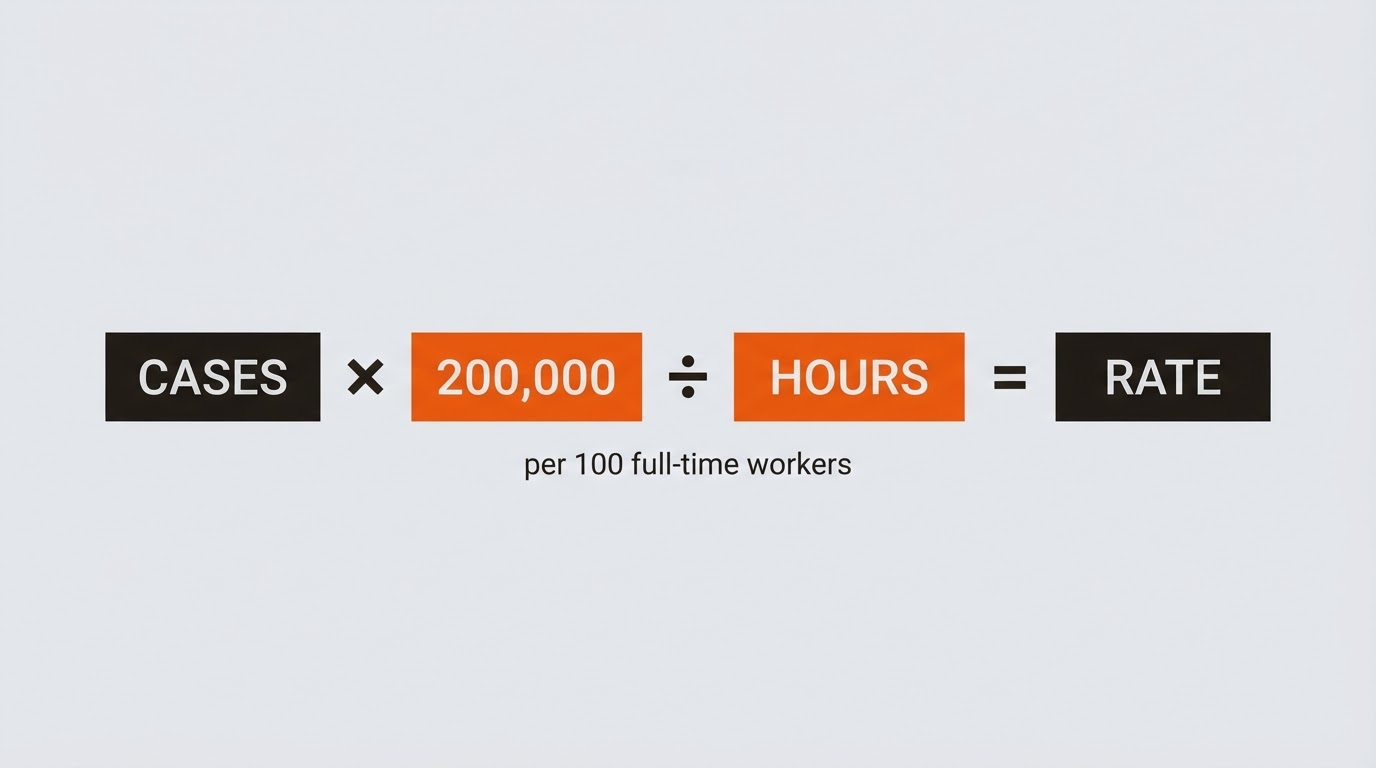
OSHA and BLS use one formula for all incidence rates: (N × 200,000) ÷ EH. Here, N stands for the number of cases in the category measured. EH is total employee hours worked during the calendar year.
The 200,000 factor normalizes data. It assumes 100 full-time employees working 40 hours weekly over 50 weeks: 100 × 40 × 50 = 200,000 hours. This makes rates comparable across businesses of any size. Calculate for the full year matching your 300A. Round results to two decimal places, standard practice for alignment with published rates.
Map Form 300A Columns to TRC and DART
Form 300A Section D lists case counts by outcome. These are mutually exclusive: each case counts in its most severe category only.
- Column G (Deaths): Fatalities.
- Column H (Days Away From Work): Cases with at least one day away, beyond the incident day.
- Column I (Job Transfer or Restriction): Cases restricted or transferred, no days away.
- Column J (Other Recordable Cases): Medical treatment beyond first aid, no days away, restriction, or transfer.
Total Recordable Cases (TRC) rate: Add Columns G + H + I + J. This captures all recordable non-zero cases.
Days Away, Restricted, or Transferred (DART) rate: Add Columns H + I only. Exclude deaths (G) and other cases (J).
Use Total Hours Worked, Not Average Employees
Form 300A requires average employees in Section E, but skip it for rates. Hours worked (EH) from Section F is the denominator. This reflects actual exposure: overtime counts, while vacation or sick time does not.
Build EH from payroll records or timesheets. See our guide on how to calculate OSHA 300A total hours worked and average employees for details on compiling this figure accurately.
Hypothetical Walkthrough: Calculate TRC and DART
Consider a small shop with these Form 300A totals: 40,000 hours worked, 0 deaths (G), 2 days-away cases (H), 0 transfers (I), 1 other recordable (J).
TRC Rate
N = G + H + I + J = 0 + 2 + 0 + 1 = 3
TRC = (3 × 200,000) ÷ 40,000 = 600,000 ÷ 40,000 = 15.00
DART Rate
N = H + I = 2 + 0 = 2
DART = (2 × 200,000) ÷ 40,000 = 400,000 ÷ 40,000 = 10.00
This example shows rates at 15.00 TRC and 10.00 DART. Plug your 300A numbers into the same steps.
What These Rates Mean—and What They Do Not
Rates track trends internally, answer customer safety questionnaires, or compare to BLS tables by NAICS code. Employers can review published BLS data for context on peers.
Rates do not replace the Form 300 log, 300A posting, or electronic submission if required. Review OSHA 300A posting requirements, zero-case 300A rules, and who must submit OSHA 300A data electronically.
FORM 300 LOGBOOK: Your Recordkeeping Workspace
FORM 300 LOGBOOK serves as a recordkeeping workspace. It generates 300A annual summaries from your log entries, keeps case counts organized, and provides audit-ready totals. Guided entry simplifies classification, like distinguishing days away from restrictions—see our article on OSHA 300 log days away vs. restricted work rules. Export organized PDF/CSV backups for secure storage.
Pull your 300A columns and hours directly for rate calculations. Explore features, how it works, and OSHA guidance.
Disclaimer: FORM 300 LOGBOOK organizes recordkeeping information but is not OSHA, is not an OSHA filing service, does not submit records to OSHA, does not replace official forms or professional/legal judgment, and does not guarantee compliance. This is not legal advice.